
DODO - Live Video Chat
Xiani Software LimitedSocial
4.3803.00 Reviews
- Version
- 1.0.148
- Installs
- 10.00M
- Age Rating
- Mature 17+
Screenshots
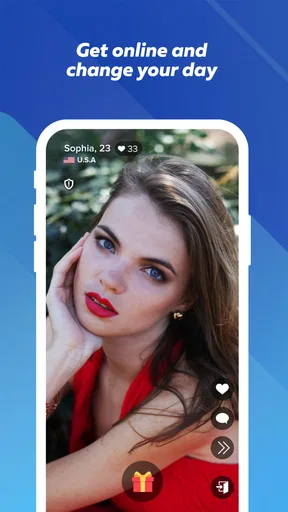
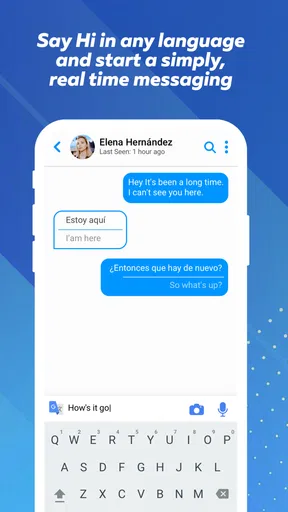




Our Review of DODO - Live Video Chat
 Analysis by Appyee
I approached DODO - Live Video Chat as someone looking for a quick way to meet people through live video rather than another text-heavy social network. It is a free social app from Xiani Software Limited, aimed at mature users and built around spontaneous conversations with interesting people. My first impression was that it feels more immediate than a conventional messaging app: the value is in deciding whether a live interaction feels comfortable and worthwhile, not in building a carefully edited profile.
That immediacy is also the main thing to understand before installing it. This is not the best choice if you want a quiet community organized around long posts, detailed interest groups, or dependable communication with people you already know. It makes more sense for adults who are open to brief video encounters and willing to leave a conversation when the match is poor. Used with that expectation, the app can be an entertaining way to break routine. Used as a substitute for a private messenger or a structured social network, it may feel too unpredictable.
What using DODO feels like in practice
The app belongs firmly to the live social-video category. Instead of asking you to spend a long time preparing a public identity, it puts the emphasis on the interaction itself. That can be refreshing when I want a social experience that starts quickly, but it also means the quality of each session depends heavily on who is available and how well the conversation develops.
The audience is substantial: DODO has passed 10 million installs and holds a 4.3 average from around 32 thousand ratings. Those figures suggest that it has reached far beyond a tiny experimental audience, although popularity should not be confused with a guarantee that every conversation will be enjoyable. Live matching always involves uneven encounters, different communication styles, and people with different reasons for opening the app.
Because the content rating is Mature 17+, I would not treat this as a family-oriented social tool. That age guidance is important for both the person using it and anyone responsible for a younger user. Adults should still apply ordinary online judgment: do not share sensitive personal information simply because a conversation feels friendly, and do not assume that a video call proves someone is exactly who they claim to be.
The strongest use case is a short break when I want human contact without arranging a call in advance. For example, after work I might open the app with ten minutes available, try a conversation, and leave if it feels awkward rather than forcing myself to stay. That makes DODO more like a social doorway than a permanent home base. It can create a pleasant surprise, but it does not remove the need to choose carefully.
Who is likely to enjoy it
I would recommend trying it if you are comfortable appearing on camera, enjoy meeting strangers, and prefer live reactions to delayed messages. It may suit someone who has moved to a new place, wants low-commitment social contact, or simply finds ordinary scrolling repetitive. The live format can make a small amount of free time feel more active than browsing posts.
I would be more cautious about recommending it to anyone who dislikes being seen, becomes frustrated by quick mismatches, or wants conversations to remain completely predictable. If your main goal is keeping in touch with friends, a familiar messenger is better. If you want topic-based discussion, a community platform with clear groups and moderation tools may give you more control. DODO’s appeal comes from spontaneity, so that same spontaneity is its central trade-off.
Starting without overcomplicating the setup
DODO is free to install, which makes it easy to test without committing money at the beginning. The current version is 1.0.148, and it supports devices running Android 8.0 or later. On iOS or Android, I would begin by checking that the phone is updated enough for the app and that I have a reasonably private place for the first session. A live-video app is much easier to judge when I am not rushing through setup in a noisy room.
My advice is to approach the first launch with a small, realistic goal: complete the basic account process, understand how the conversation flow works, and have one comfortable interaction. Trying to optimize everything before speaking to anyone usually creates unnecessary pressure. The first useful test is not whether the app can entertain me for an entire evening; it is whether I can enter, understand what is happening, and leave a conversation cleanly when I want to.
I would also decide in advance what I am willing to reveal. A first conversation does not require my full name, workplace, exact location, or other identifying details. Keeping the background neutral is a simple but effective habit, especially when I am still learning how the social side of the app works. If a person pushes for information I would not normally share with a stranger, that is a reason to end the interaction, not a reason to explain myself repeatedly.
How to reach the first meaningful conversation
The first successful action is not merely opening a video screen. For me, success means finding a conversation that feels understandable and respectful within the first moments. I would start with a simple greeting and an easy question, then pay attention to whether the other person responds naturally. A short opening works better than trying to perform or invent an impressive introduction.
One useful technique is to treat the first exchange as a quick compatibility check. Can both people hear and see each other clearly? Is the pace comfortable? Does the other person respect ordinary boundaries? If the answer is no, moving on is not failure. It is part of using a live matching app efficiently. The mistake many first-time users make is staying too long in an uncomfortable interaction because they believe they must rescue it.
When a conversation is promising, I would keep the first topic light and specific. Talking about a hobby, a recent meal, a favorite type of music, or a place someone enjoys can reveal whether there is genuine curiosity without demanding private details. If the exchange becomes natural, it can continue. If it remains one-sided, ending politely is a better outcome than forcing a connection that is not there.
Another practical tip is to use the app when I have enough attention to participate. Opening it while multitasking can make the experience seem worse than it is. A person who is distracted may miss a question, appear uninterested, or judge a conversation unfairly. Even a short session benefits from a few uninterrupted minutes and a stable environment.
Confusing moments new users should expect
The biggest adjustment is that live social apps do not behave like contact lists. In a messenger, I usually know who I am contacting and why. In DODO, the point is discovery, so the first interaction may not match my expectations. A quiet conversation, an immediate mismatch, or a person who leaves quickly does not necessarily indicate a technical problem. It may simply be the normal uncertainty of meeting strangers.
I would not interpret every fast ending personally. People open social apps with different energy levels and intentions, and a live format makes those differences visible immediately. The healthiest approach is to judge the overall session rather than one exchange. If several interactions feel uncomfortable, I would close the app and return later instead of trying to force a better result through frustration.
Another possible source of confusion is the difference between free access and optional spending. DODO is free, but it includes in-app purchases ranging from $0.99 to $274.99 per item. I would treat those purchases as optional extras and avoid buying anything impulsively during an exciting conversation. Before spending, I would make sure I understand what an item does, whether it is genuinely useful to my way of using the app, and whether the cost fits my budget.
This pricing range is especially relevant for first-time users because live social environments can encourage quick decisions. My rule would be simple: use the free experience long enough to decide whether the basic interaction is valuable before considering any purchase. If the free version does not feel comfortable or enjoyable, spending more is unlikely to solve the underlying problem.
Privacy and personal boundaries can also be confusing because video creates a stronger sense of familiarity than text. Seeing a face may make a stranger feel trustworthy very quickly, but it does not establish a real-world relationship. I would avoid moving immediately to private contact details, financial requests, or personal arrangements. If someone becomes aggressive, sexual in a way I do not welcome, or manipulative, I would end the session rather than negotiate with them.
Making the experience more useful over time
After the first successful conversation, I would use DODO in short, intentional sessions rather than leaving it open indefinitely. A clear purpose helps: meeting someone new, practicing casual conversation, or taking a break from passive content. This approach makes it easier to notice whether the app is actually adding something to my day or simply consuming time.
A less obvious benefit of short sessions is that they help me identify my own preferences. After several attempts, I can recognize which openings lead to comfortable exchanges and which situations drain my energy. I might discover that I prefer brief conversations with clear topics, or that I enjoy completely spontaneous chats. That self-knowledge is more useful than chasing an ideal interaction every time I open the app.
I would also separate entertainment from trust. A funny or engaging conversation can be enjoyable without becoming a reason to disclose more information. Keeping those two judgments separate helps preserve the fun of live video while reducing the chance of making decisions based on a temporary emotional high.
The app’s social design is best compared with ordinary alternatives by asking what kind of control I want. A messaging app gives me control over my contacts and timing. A public social feed gives me control over what I publish and browse. A topic-based community gives me control over the subjects I follow. DODO gives me more immediacy and surprise, but less certainty about who will appear and how the interaction will go. None of those models is universally better; they serve different moods.
For someone who wants a dependable conversation with a known friend, I would choose a messenger every time. For someone who wants to practice meeting unfamiliar people without planning a full event, DODO is more relevant. For someone who wants detailed profiles and a slower process of getting to know others, a more structured social or dating service may be a better fit. The right choice depends on whether spontaneity feels exciting or tiring.
When I would stop using it
I would stop a session immediately if the interaction became disrespectful, pressured, or uncomfortable. I would also take a break if I noticed myself opening the app automatically without enjoying the conversations. A social tool should support my free time, not turn every quiet moment into an obligation to respond to strangers.
I would skip DODO entirely if I needed a platform for professional networking, private family communication, or carefully moderated specialist discussion. Its live-video premise is not designed for those needs. I would also avoid it if I could not use a camera comfortably or if I was looking for a completely anonymous text experience. Choosing a different kind of app in those situations is not missing out; it is matching the tool to the task.
My recommendation for a first session
My suggested path is straightforward: install the free app on a compatible device, complete the initial setup without oversharing, and begin with one modest conversation. Give the interaction enough attention to judge it fairly, but do not feel responsible for making every match work. Keep purchases out of the first test, protect personal details, and leave promptly when a conversation crosses a boundary.
For adults who genuinely enjoy spontaneous video contact, DODO can be a lively change from endless scrolling and delayed messages. Its large audience gives the concept a real chance to work, while its mature rating and unpredictable encounters call for sensible boundaries. I like it most as a short, optional social activity rather than a replacement for established relationships.
My final view is positive but selective: DODO is worth trying when you want live discovery, not guaranteed familiarity. The best results come from entering with realistic expectations, treating each encounter as a brief human interaction, and remembering that leaving is always a valid choice. If that balance sounds comfortable, the app offers a simple way to see whether an unexpected conversation can improve an ordinary day.
Verdict
Strengths of DODO - Live Video Chat
- Quickly connects you with people for spontaneous video conversations.
- Simple interface makes starting a live chat easy for new users.
- Live interactions feel more personal than text-based social apps.
- Useful filters and matching options help discover new chat partners.
- Available on mobile, making conversations convenient while traveling.
Limitations of DODO - Live Video Chat
- Chat quality can vary widely depending on the person you are matched with.
- Some features may require in-app purchases or a premium subscription.
- Unexpected video interactions may feel uncomfortable for privacy-conscious users.
- A stable internet connection is needed for smooth video and audio.
- Users should remain alert for inappropriate behavior or suspicious profiles.
Similar Picks in This Category
View All
Meta Platforms, Inc.4.6

Instagram4.0

Likee-Live, Chat & Party Games
Likeme Pte. Ltd.4.4

Facebook Lite
Meta Platforms, Inc.4.5

TikTok - Videos, Shop & LIVE
TikTok Pte. Ltd.4.0

Moj: Free Short Drama & Reels
ShareChat4.1
Frequently Asked Questions
What is DODO - Live Video Chat used for?
DODO - Live Video Chat is designed for meeting people through live video conversations and social interaction. Users can typically browse profiles, start one-to-one video chats, send messages, and discover new contacts based on shared interests or availability. The experience is focused on real-time communication, so a stable internet connection, a working camera, and a microphone are important for using its main features comfortably.
Is DODO - Live Video Chat free to download and use?
The app may be free to download, but some features can require in-app purchases, credits, subscriptions, or other paid options. Video calls, virtual gifts, profile visibility, or premium communication tools may not all be included in the basic experience. Before spending money, check the current pricing, renewal terms, and purchase rules shown in the app store and inside the application.
Is DODO - Live Video Chat safe for meeting strangers?
As with any live video chat platform, users should be careful when communicating with people they do not know. Avoid sharing your home address, phone number, passwords, financial details, or private documents. Use the available block and report tools if someone behaves suspiciously or sends inappropriate content. Parents should also review the app’s age rating and privacy options before allowing younger users to access it.
What permissions does DODO - Live Video Chat require?
The application may request access to your camera and microphone so that video calls and voice communication can work correctly. It may also request notifications, photos, contacts, or storage-related permissions depending on the features available on your device. Grant only permissions that you understand and need. You can review or change these settings later through Android or iOS privacy controls.
What should I do if video calls are lagging or not connecting?
Poor video quality is usually related to a weak Wi-Fi or mobile-data connection, limited device performance, disabled camera or microphone permissions, or temporary server problems. Try switching networks, closing other apps, restarting DODO, and checking the permissions in your device settings. Keeping the app updated can also help. If the issue continues, use the in-app support option and include useful error details.
